Summary
MCP (Model Context Protocol) lets an AI agent read live TRBOnet data to check system status, investigate communication issues, and find configured radios and users. Access is read-only, with no access to the database or historical data.
You can use any AI agent that supports MCP: ChatGPT Codex, Kimi Claw and Antigravity (with Claude Sonnet and Gemini) were successfully tested with the feature. This article describes setup and use with Codex. AI Agent can summarize the returned data and suggest further checks. A confirmed root cause may require additional diagnostics.
License Requirements
The MCP option must be active in the license of each application you want to connect: TRBOnet Enterprise/Plus and TRBOnet Watch.
TRBOnet Enterprise/Plus Configuration
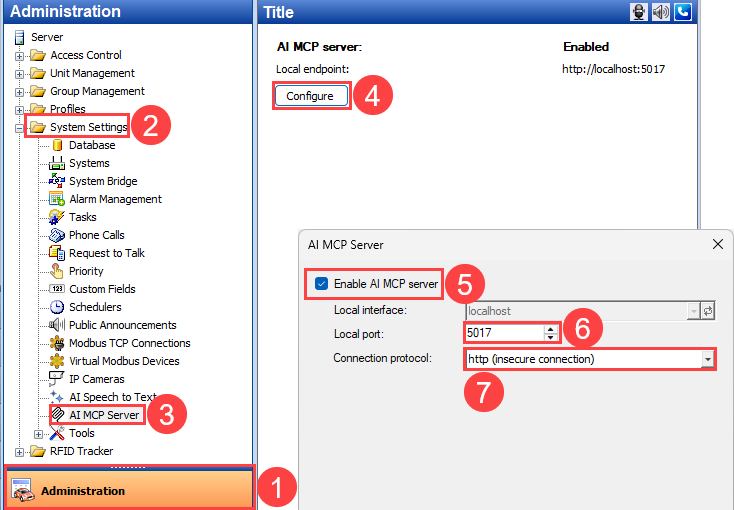
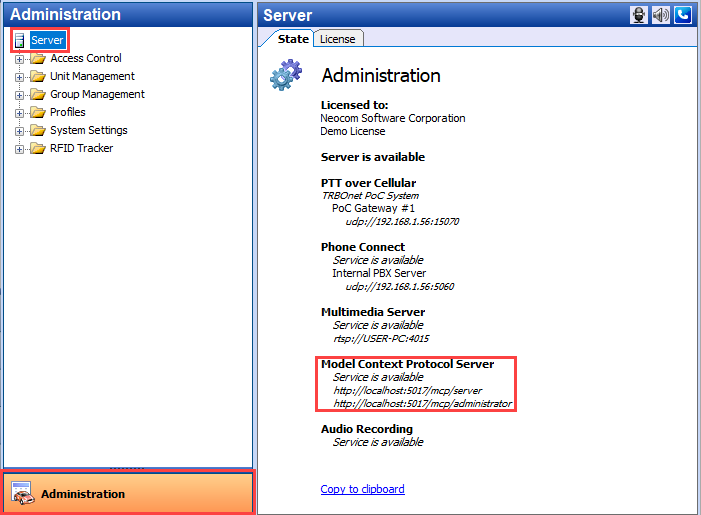
The server address comes from .
TRBOnet Watch Configuration
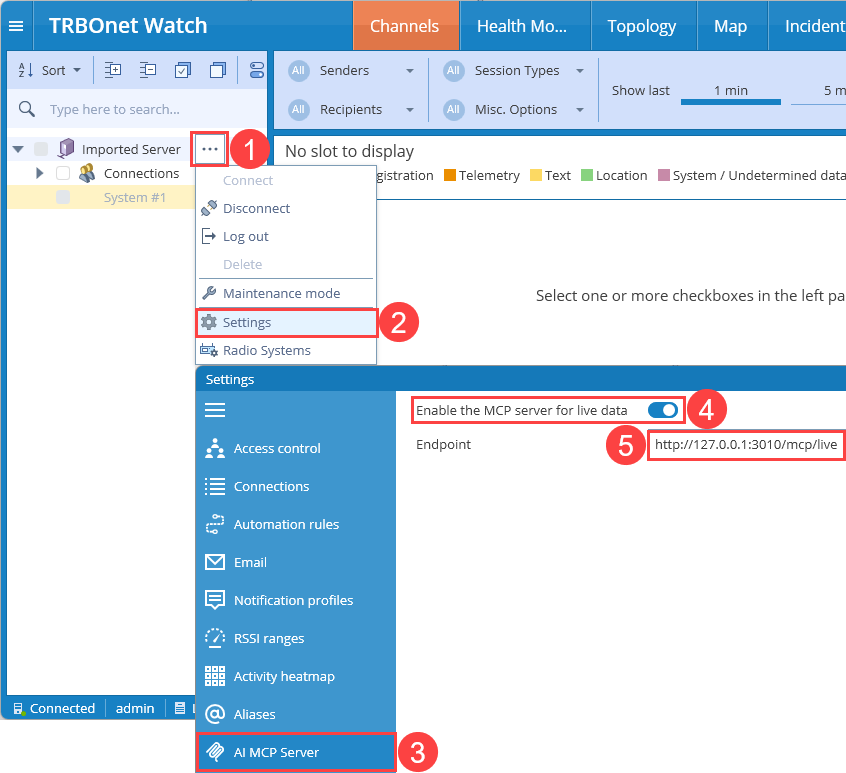
Restarting the TRBOnet Watch service is not required.
Connect Codex
You do not need to edit the Codex configuration manually. Send the following prompt to Codex:
Provide only the endpoints you want to use. If Codex requests a restart or approval to update its configuration, follow the prompt.
Optional Manual Configuration
You can also add the connections to %USERPROFILE%\.codex\config.toml. Replace each placeholder below with the full endpoint URL shown in the corresponding console.
[mcp_servers."TRBOnet Server"]
url = "TRBONET_SERVER_ENDPOINT_URL"

[mcp_servers."TRBOnet Administrator"]
url = "TRBONET_ADMINISTRATOR_ENDPOINT_URL"

[mcp_servers."TRBOnet Watch"]
url = "TRBONET_WATCH_ENDPOINT_URL"
For Enterprise/Plus, use the server address, available port, and protocol selected for your installation. For TRBOnet Watch, use the fixed HTTP endpoint shown in the console. See the Codex MCP documentation.
Instructions for Codex Example
Paste these instructions into the chat before requesting diagnostics:
TRBOnet Enterprise/Plus Request Examples
Check mobile client registration and request queues using TRBOnet Server. Show any gateways with pending requests and summarize what needs investigation.
Find the radio named Warehouse using TRBOnet Administrator. Show its configured properties and current status where available.
TRBOnet Watch Request Examples
Check the current TRBOnet Watch network status. List disconnected repeaters and devices with active alarms, grouped by system.
Use TRBOnet Watch to show monitored computers with less than 20% free disk space. Include the computer name, disk, and free space.