Summary
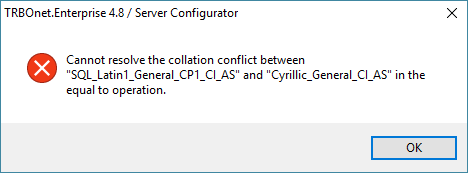
This article explains how to resolve a collation conflict error that may appear when updating a TRBOnet database to a newer version.
This occurs when the collation of one or more columns inside a table does not match the database's default collation:
How to Fix the Collation Conflict
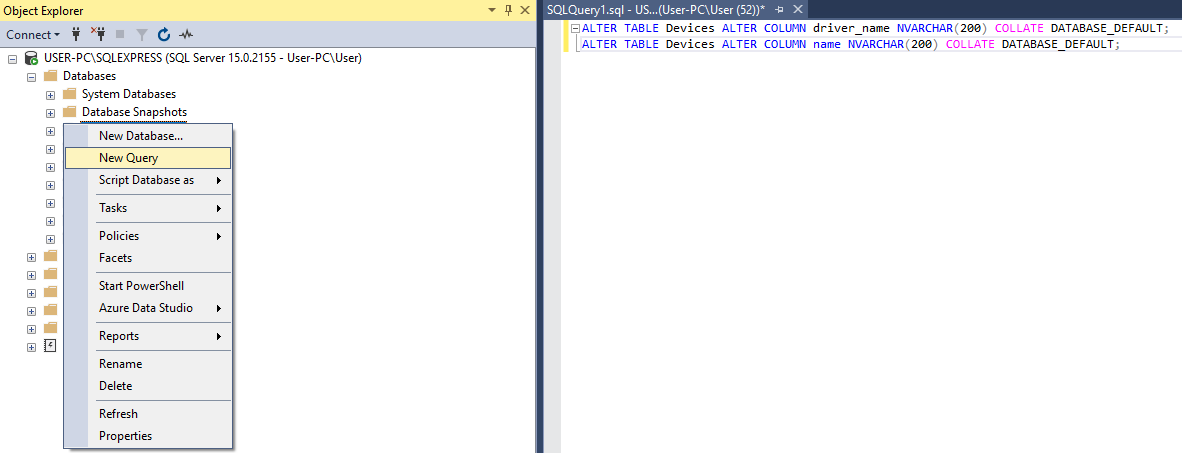
1. Open the database in , right-click the database, and select .
2. Paste the following commands into the query window:
ALTER TABLE Devices ALTER COLUMN driver_name NVARCHAR(200) COLLATE DATABASE_DEFAULT;
ALTER TABLE Devices ALTER COLUMN name NVARCHAR(200) COLLATE DATABASE_DEFAULT;
ALTER TABLE Devices ALTER COLUMN name NVARCHAR(200) COLLATE DATABASE_DEFAULT;
3. Execute the query.