Summary
This article describes how to integrate HALO Smart sensors with TRBOnet to receive sensor events and view the sensor dashboard via RTSP.
Receiving Sensors Information
1. Configure the LAN address of TRBOnet Server computer and port in HALO Smart Sensor to send Sensor events. The 127.0.0.1 address is not allowed.
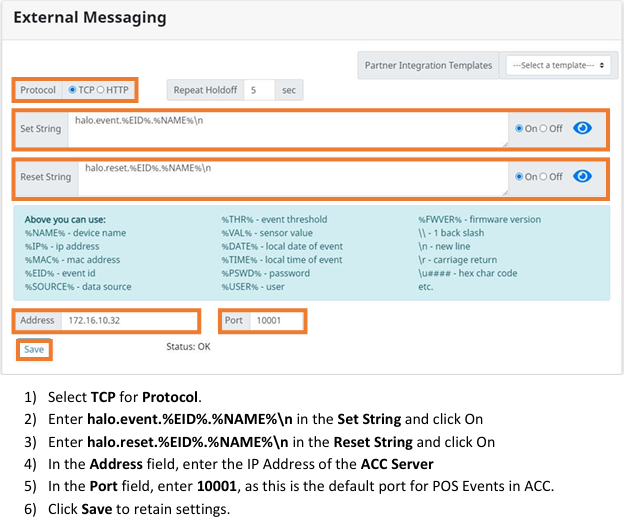
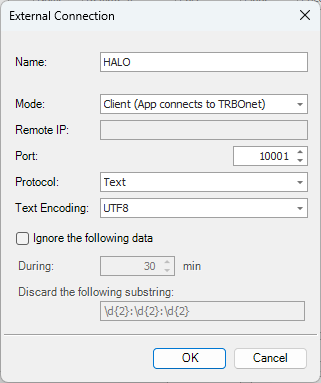
2. Open TRBOnet Server Configurator and navigate to . Add connection to HALO Smart Sensor. Set Operation Mode to "Client".
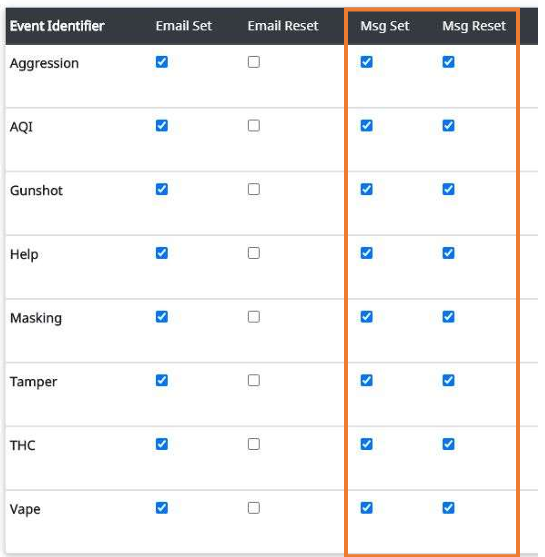
3. Configure an Alarm Management Rule for desired Action based on Events configured in HALO Smart Sensor.
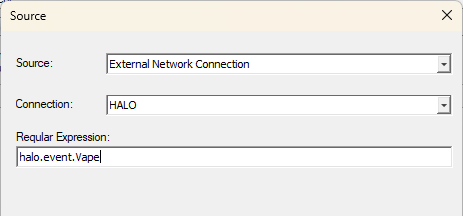
Example for Vape event below:
Viewing HALO Smart Sensor Dashboard
1. Enable and configure RTSP in HALO Smart Sensor.
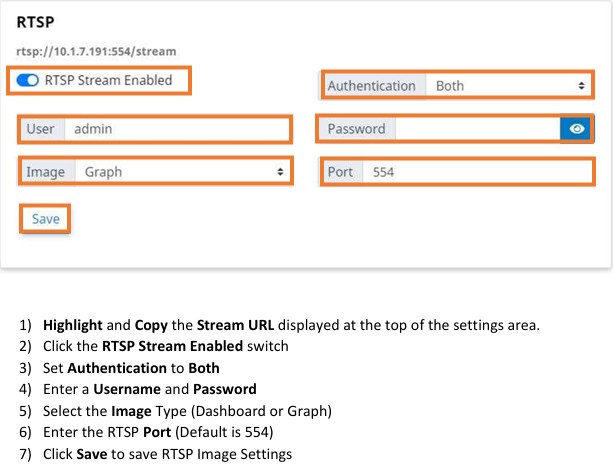
2. In TRBOnet Dispatch Console navigate to .
3. Add a HALO Smart Sensor using RTSP parameters set. Use the following link to stream:
rtsp://<HALO Sensor IP:port>/stream
Screenshots of HALO Sensor configuration pages are taken from HALO Smart Sensor Manual for Avigilon integration.
External resource: HALO Smart Sensors