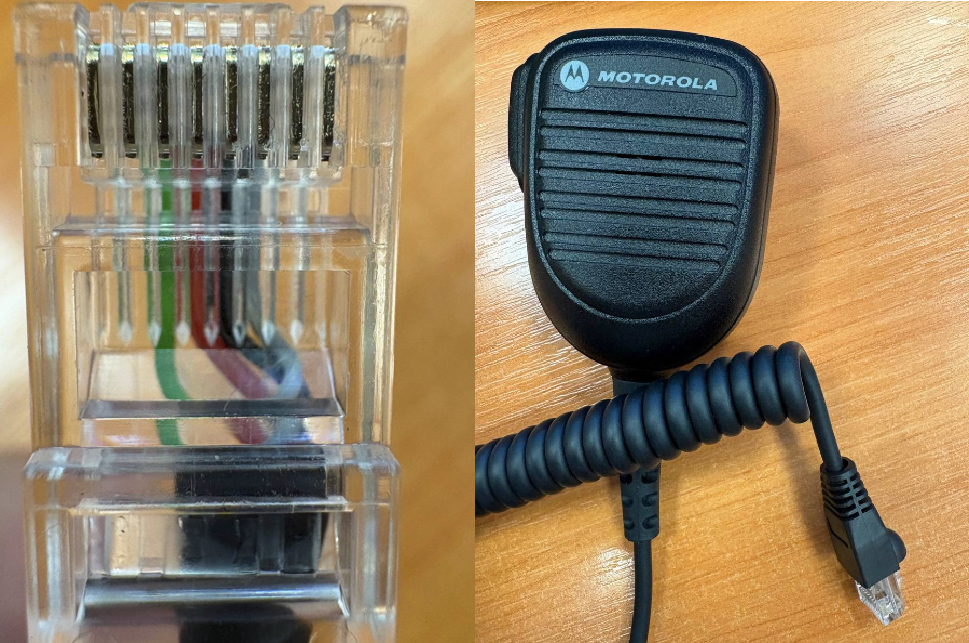
Motorola PMN4107B modification for usage with M002 mic adapter
The article was successfully sent to the email
Summary
This guide describes the process of adapting a standard Motorola PMN4107B PTT (speaker-microphone) for use with the M002 mic adapter interface. It covers cable preparation, RJ45 pinout, and proper crimping procedure.
To complete this modification, you will need the following tools:
Before you begin make sure to slide the protective rubber boot onto the PTT cable before cutting wires and crimping the connector. Once the connector is crimped, it will be impossible to fit the boot onto the cable.
Step 1: Cable Preparation and Stripping
Step 2: Trimming to RJ45 Size
You do not need to strip the individual insulation from the color-coded wires. The RJ45 connector blades will pierce through the insulation on their own.
| RJ45 Pin Number | Wire Color | Signal |
|---|---|---|
| 1 | (empty) | - |
| 2 | (empty) | - |
| 3 | Green | PTT (Push-to-Talk) |
| 4 | Red | MIC (Microphone) |
| 5 | Black | GND (Ground / Common) |
| 6 | Grey | HOOK (Hang-up sensor) |
| 7 | (empty) | - |
| 8 | (empty) | - |
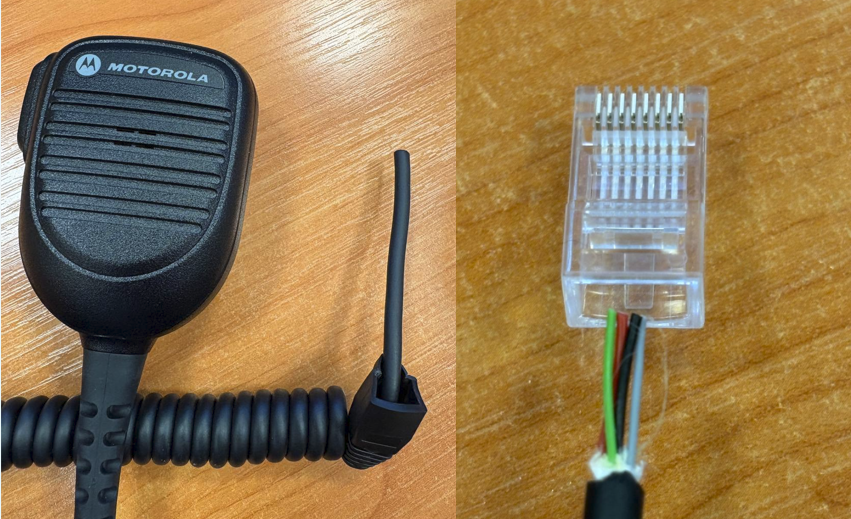
If the wire colors differ.
The manufacturer may change the internal color coding of conductors across different production batches of Motorola PMN4107B PTT.
If, after removing the outer jacket, you discover wire colors that do not match the table above, do not proceed with crimping blindly. In this case, you must first identify the correct contacts using a multimeter, or contact TRBOnet support team (support@trbonet.com) to obtain an up-to-date color mapping reference.
Step 3: Inspection and Crimping