Connect Plus systems are not supported in Watch 4.0.
Interconnection between TRBOnet Watch 4.0 and TRBOnet Enterprise\Plus is possible starting 6.2 only.
Before Upgrade
1. License Requirement
Ensure that you have a dedicated license for Watch 4.0. Licenses for Watch 3.2 are not compatible, even if the subscription is still active.
Ensure that you have a dedicated license for Watch 4.0. Licenses for Watch 3.2 are not compatible, even if the subscription is still active.
2. Database Requirement
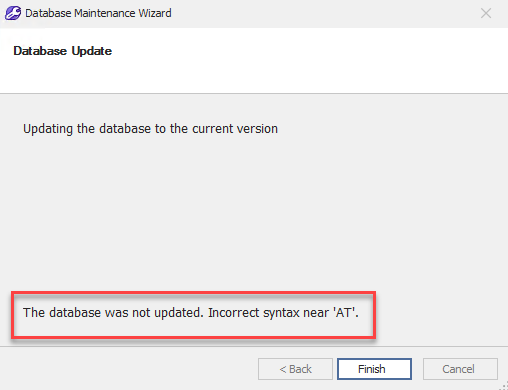
Watch 4.0 requires MS SQL Server 2016 or newer. Older SQL Server versions are not supported. If you are running an older version, you may receive an error similar to the one shown below:
Watch 4.0 requires MS SQL Server 2016 or newer. Older SQL Server versions are not supported. If you are running an older version, you may receive an error similar to the one shown below:
3. Database Health Check
Run the Test Database procedure. If any errors occur, create a support ticket at support@trbonet.com and provide:
• Watch Database Backup
• Server configuration file
• SQL Server version
Run the Test Database procedure. If any errors occur, create a support ticket at support@trbonet.com and provide:
• Watch Database Backup
• Server configuration file
• SQL Server version
4. Backup Server Configuration
Create a manual copy of the configuration file before upgrade:
C:\ProgramData\Neocom Software\TRBOnet.Watch
Create a manual copy of the configuration file before upgrade:
C:\ProgramData\Neocom Software\TRBOnet.Watch
5. Backup Database
Perform a full Watch Database Backup.
Perform a full Watch Database Backup.
After Upgrade
If the Test Database procedure returns errors after the upgrade:
• Create a support ticket at support@trbonet.com
• Attach:
- Watch Database Backup (taken before the upgrade)
- Server configuration file
• Specify:
- SQL Server version
- Watch version before upgrade
• Create a support ticket at support@trbonet.com
• Attach:
- Watch Database Backup (taken before the upgrade)
- Server configuration file
• Specify:
- SQL Server version
- Watch version before upgrade