IN THIS ARTICLE

Reducing TRBOnet Database size

Incorrect email!

The article was successfully sent to the email

This article explains how to reduce database size before or after newer TRBOnet version install and before Database upgrade attempt.

Before new version install

1. Remove old or unnecessary data using TRBOnet Database maintenance tools.
2. Take a backup.
3. Proceed with the software and database upgrade.

After new version install without Database upgrade attempt

If a backup is available
1. Roll back to the previous version of the software.
2. Restore the database from the backup.
3. Remove old or unnecessary data.
4. Create a final clean backup.
5. Proceed with the software and database upgrade.

If a backup is not available

Step 1: Check Database State

1. Open SQL Server Management Studio.
2. Verify that the database is in MULTI_USER mode.

Step 2: Stop TRBOnet Service

1. Stop the TRBOnet service before making database changes.
2. Keep the service stopped during maintenance to prevent new data from being written to the database.

Step 3: Identify Large Tables

Before making changes, check which tables use the most space.

USE {database_name};
GO
sp_msforeachtable N'EXEC sp_spaceused [?]';
GO

This script shows the size of each table, including related objects such as indexes.
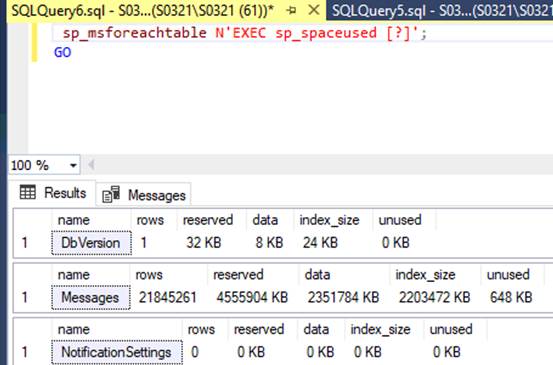
Tables index size

Step 4: Rebuild Indexes

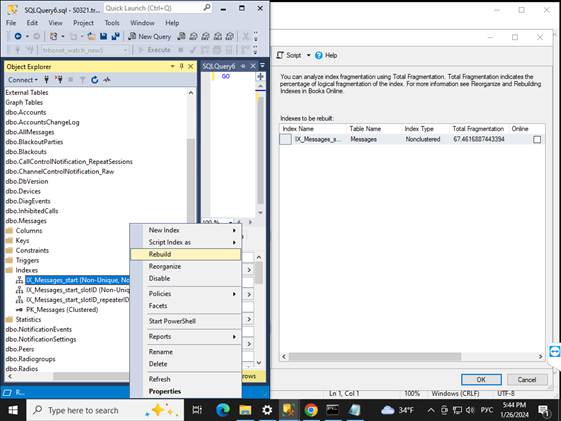
1. Rebuild indexes where fragmentation is greater than 20%.
2. Focus first on the largest tables identified in Step 3.
Rebuild index dialog in SSMS

Step 5: Shrink the Database

After rebuilding indexes, SQL Server still reserves space based on previous data size.

To reclaim unused space, shrink the database:
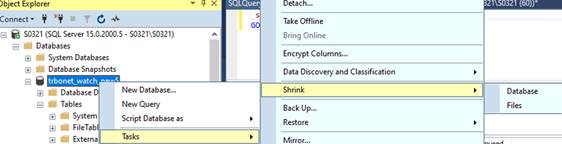
Shrink database option in SSMS

Step 6: Delete Old Data

The recommended method is to use the internal stored procedure sp_ClearOldData instead of a standard DELETE statement.

Example for the table with GPS data [GpsInfo]:

DECLARE @return_value int

EXEC @return_value = [dbo].[sp_ClearOldData]
@tableName = N'GpsInfo',
@dateColumnName = N'date',
@date = '2022-11-07 00:00'

This procedure processes data in batches using multiple transactions. It reduces transaction log growth and usually performs better than a standard DELETE.

The procedure deletes all records older than the specified date, starting from the oldest records. Make sure the date is correct before running the script.

Standard DELETE example
DELETE FROM [TRBOnet].[dbo].[GpsInfo]
WHERE [date] < '2022-11-07 00:00 +03:00'
Important Notes
Replace the example date with your own date.
TRBOnet uses datetimeoffset in the database.
Time is stored in UTC together with a time zone offset.
A time zone offset must be specified in the scripts when applicable.
In the example above, +03:00 represents a UTC+3 time zone.

Step 7: Shrink the Database

After deleting old data, perform another database shrink to reclaim the freed space.

1. Open the database context menu.
2. Select Tasks Shrink Database.

Step 8: Run the Database upgrade