Starting from version 6.2.1, TRBOnet Enterprise/Plus can send voice recordings and call metadata to Eventide NexLog recorders.
Requires the External Voice Recorder Support feature in the TRBOnet license.
Supported NexLog Models
Firmware 2024.2 or newer required:
• NexLog 740 DX
• NexLog 840 DX
• NexLog EXP
Supported Metadata
| Metadata Field | Supported |
|---|---|
| Call Type (Group / Private / Phone) | ✔ |
| Radio ID | ✔ |
| Talkgroup ID | ✔ |
| Radio Alias | ✔ |
| Talkgroup Alias | ✔ |
| GPS Latitude / Longitude | ✘ |
Configuration
1. Open .
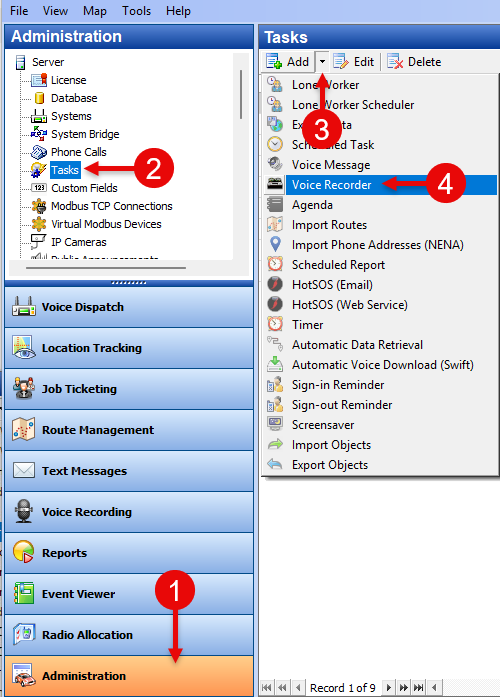
2. Set .
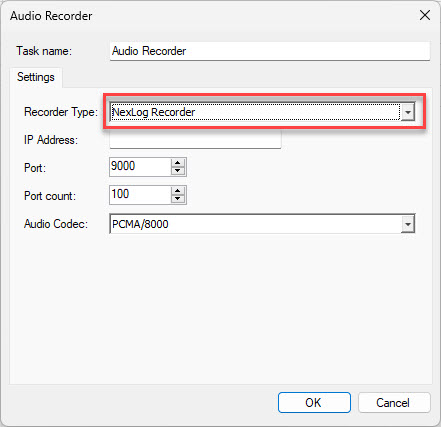
3. Enter:
• IP Address of NexLog
• Port (starting port number)
• Port Count (number of channels)
Port Count must match the number of channels configured on the NexLog side.
For reliability, allocate additional ports (recommended: Voice Channels × 2) to avoid RTP port reuse issues when connections are interrupted and previous ports remain reserved by the OS (e.g., TIME_WAIT state, NAT timeout).
For reliability, allocate additional ports (recommended: Voice Channels × 2) to avoid RTP port reuse issues when connections are interrupted and previous ports remain reserved by the OS (e.g., TIME_WAIT state, NAT timeout).
4. Enable the task (✔) to start audio forwarding.