Current TRBOnet versions support silent installation and include an .msi package for centralized deployment solutions (e.g., GPO, SCCM, Intune).
.msi Package Extraction
1. Access Command Prompt (CMD) with Administrator privileges
2. Set directory to the .exe file location with
3. Input .exe file name and add command
Code example for the .exe file located on disk C:
C:\> TRBOnet.Enterprise_X.X.X.XXXX.exe /extract:c:\FOLDER
Where:
• - the downloaded .exe install package
• c:\FOLDER - any desired folder on disk for extraction
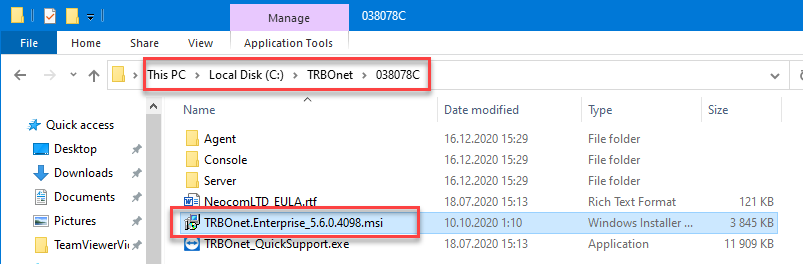
The 038078C folder contains the .msi package. The .msi package can be used afterwards with centralized deployment solutions.
Silent Installation Parameters
| Parameter | Description |
|---|---|
| Defines which components will be installed | |
| Fully silent installation (no UI) | |
| Shows progress bar, no user interaction |
Install Level Options
| Component | installlevel=10 | installlevel=50 | installlevel=100 |
|---|---|---|---|
| TRBOnet Dispatch Console | ✔ | ✔ | ✔ |
| TRBOnet One Console | ✔ | ✔ | ✔ |
| TRBOnet Server | ✘ | ✔ | ✔ |
| TRBOnet Software Agent | ✘ | ✘ | ✔ |
The TRBOnet Software Agent cannot be installed separately.
Silent Installation Examples
Using the .exe Installer
C:\> TRBOnet.Enterprise_X.X.X.XXXX.exe installlevel=100 /qn
Using the .msi Installer (after extraction)
C:\FOLDER\038078C> msiexec /i TRBOnet.Enterprise_X.X.X.XXXX.msi installlevel=50 /qn