TRBOnet Watch allows monitoring the operating state of MOTOTRBO repeaters.
All repeater states are read-only, except Enable/Disable, which can be controlled directly from Watch.
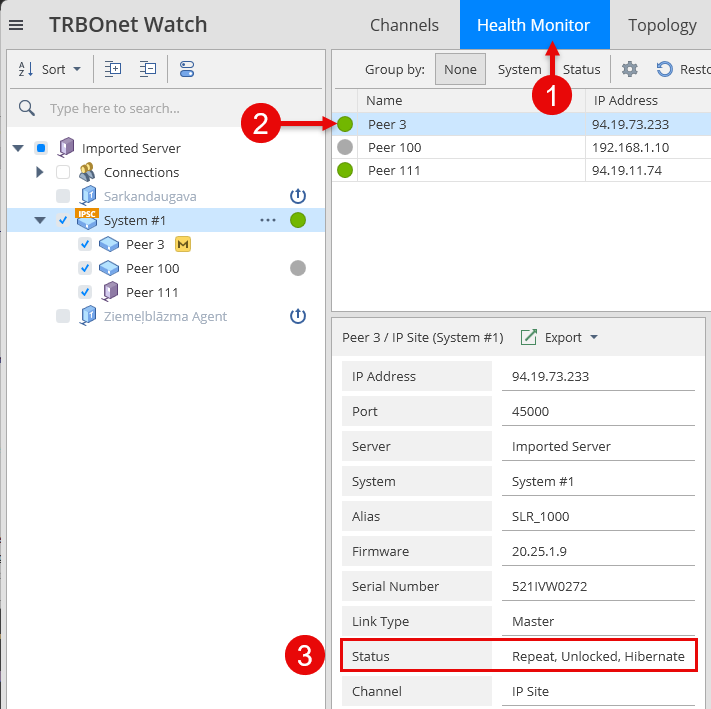
Viewing and Changing Repeater State
1. Open
2. Select
3. Locate the row
Repeater State Definitions
| State | Value | Description | Mode Support |
|---|---|---|---|
| Enable / Disable |
0 = Enable 1 = Disable |
When enabled, the repeater performs TX/RX and repeat functions. When disabled, no RF activity is performed. | Analog & Digital |
| Repeat Mode |
0 = Knockdown 1 = Repeat |
Knockdown: Repeater does not repeat received signals, but TX/RX can be controlled externally. Repeat: Normal repeater operation. |
Analog: 0/1 Digital: 1 only |
| Failure Status |
0 = Locked 1 = Unlocked |
Locked: Repeater is in failure state (TX/RX or repeat unavailable). Unlocked: Operating normally. |
Analog & Digital |
| Operation Mode |
0 = Normal 1 = Hibernate |
Hibernate: Repeater is idle (no voice/data activity) but ready to operate. |
Analog: 0 only Digital: 0/1 |
About Hibernate State
Hibernate mode is entered when the Subscriber Inactivity Timer (SIT) expires.
Repeater exits Hibernate when new activity is detected.
• Default SIT: 6000 ms
• Range: 1000–7000 ms
Do not set SIT lower than the Call Hang Time on subscriber radios — otherwise the repeater may terminate calls prematurely.
System-Specific Notes
| System Type | Hibernate Behavior |
|---|---|
| CapMax/ConnPlus | Control Channel repeaters never enter Hibernate. |
| CPSS/CPMS | Rest Channel transmits beacon information but does not change Hibernate state. Beacon signal is used by subscriber radios to detect coverage and make roaming decisions. |