Important
Make sure to back up your configuration files (Enterprise/Plus or Watch versions prior to 4.0) and database (Watch 4.0) before making any changes. Incorrect modifications may affect system functionality.
Restricted Access to System (RAS) is an Enhanced security feature that is used to provide additional protection of data within the system.
With RAS enabled on both repeaters and radios, manual updates are required in the TRBOnet configuration files.
Applicable to IP Site Connect and Conventional systems without NAI Data or Data over Control radio. If NAI Data or Control radio is used, or the system type differs, skip these steps.
Radio system сonfiguration
- Check that RAS is enabled in repeater codeplug(s).

- Check that RAS is also enabled in radio codeplug(s) with the same Authentication Key.

Modify Enterprise/Plus or Watch (versions prior to 4.0) configuration files
- Stop the service.
- Close the Server Configurator.
- Open the server configuration file:
C:\ProgramData\Neocom Software\TRBOnet.Enterprise\TRBOnet.Enterprise.Server.configusing a text editor (e.g., Notepad) with Administrator rights. - For Watch Server configuration file:
C:\ProgramData\Neocom Software\TRBOnet.Watch\TRBOnet.Watch.Server.configusing a text editor with Administrator rights. - Locate the line
<ControlCRC>True</ControlCRC>and change it to<ControlCRC>False</ControlCRC>

- Save the file(s).
- Reopen the Server Configurator and restart the service.
Modify Watch 4.0 RAS handling
In version 4.0, the Watch configuration is no longer stored as a separate file editable in a text editor. The configuration is now part of the Watch SQL database.
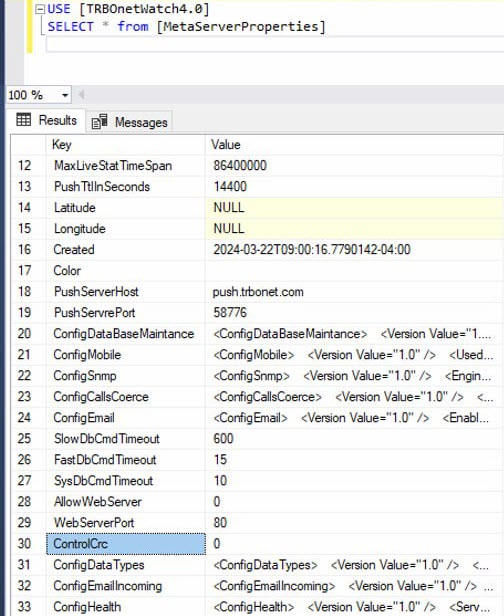
To change the RAS handling setting, update the database table as follows:
- Stop the Watch Service.
- Close the Watch Server Configurator.
- Open SQL Management Studio and select the Watch database.
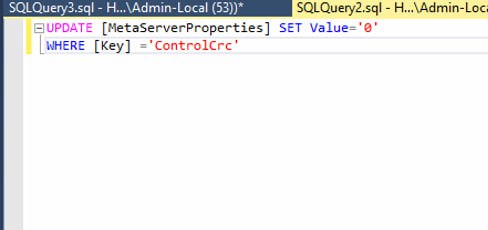
- Run the following command:
UPDATE [MetaServerProperties] SET Value='0' WHERE [Key]='ControlCrc'
- Restart the Watch Service.