Mixed Mode authentication allows login using a dedicated SQL Administrator (SA) account with its own username and password, in addition to Windows authentication. This is particularly useful when Windows accounts change or authentication fails.
SQL Server Installation
1. After the step, the screen will appear:
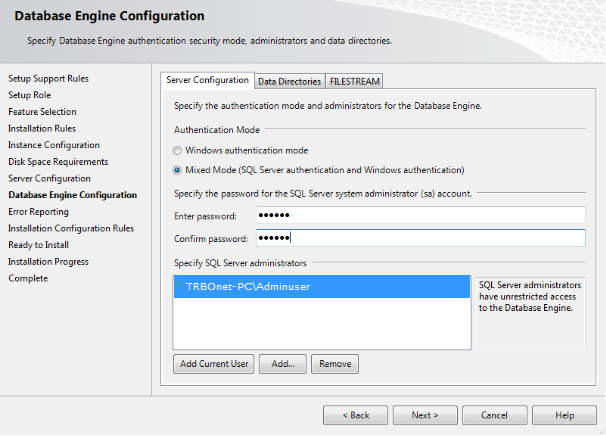
2. On this screen, select
3. Set a password for the SA account
4. Add your user account to the list of SQL Server Administrators by clicking
Alternative Method: Enabling Mixed Mode via Registry
1. Open the Windows Registry Editor and locate the following key for your SQL instance:
Registry Key: HKEY_LOCAL_MACHINE\SOFTWARE\Microsoft\Microsoft SQL Server\MSSQL14.SQLEXPRESS\MSSQLServer
2. Change the value to
2
3. Open and execute the following commands:
USE [master];
GO
ALTER LOGIN sa ENABLE;
GO
ALTER LOGIN sa WITH PASSWORD = 'trbonet.com';
GO
GO
ALTER LOGIN sa ENABLE;
GO
ALTER LOGIN sa WITH PASSWORD = 'trbonet.com';
GO